Superion Logo Full Color w Tag Line 1
Inquiries: 604.259.7647

|

Support: 888.318.5118

|

Tech Verification
BLOG

The Machine That Can't Be Updated: IT Risk on the Manufacturing Floor 

October 15, 2026

Key Takeaways

  • CNC machines and other equipment often run outdated operating systems, creating security vulnerabilities.
  • Ransomware attacks typically target office systems, halting production by encrypting critical software rather than machine controllers.
  • To secure legacy equipment, separate machine areas from office networks and strictly limit access between them.
  • Backup essential production data and implement controlled vendor access to enhance security.
  • Assess your network by answering key questions about machine controller access and downtime recovery plans.

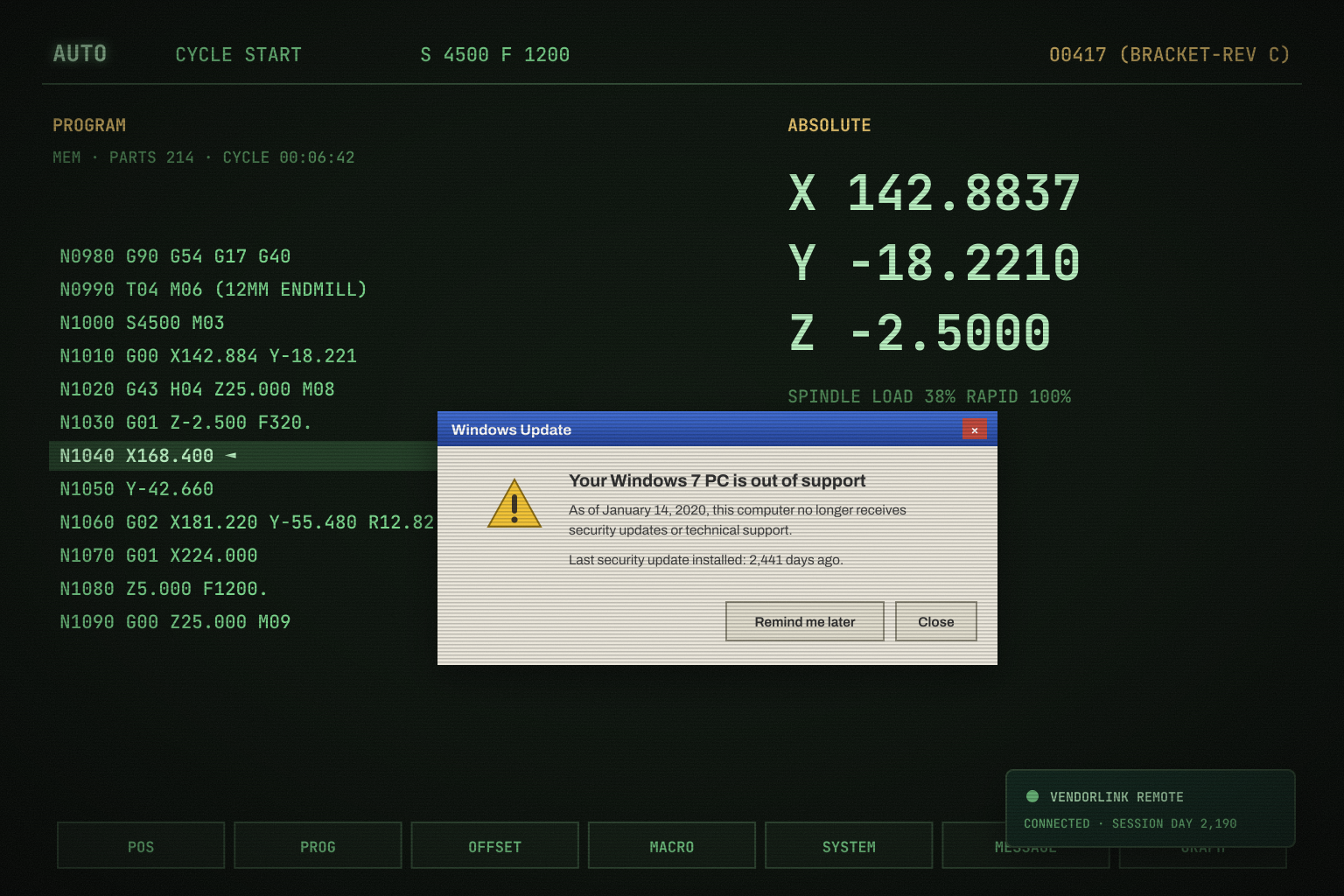
Walk the floor of almost any established manufacturer or fabrication shop in BC and you will find it: a CNC machine, press brake, saw line, or coordinate measuring machine whose controller runs an operating system that stopped receiving security updates a decade ago. The machine itself is excellent — a quarter-million-dollar asset with twenty years of service left — but the computer bolted to it is frozen in time, because the equipment vendor certified the software once and will not support anything newer. 

Standard IT advice says to patch or replace unsupported systems. On the shop floor, that advice is useless: nobody replaces a working machining centre because Windows 7 aged out. The realistic question is different: how do you run equipment that can never be secured, safely, alongside a modern business network? The answer is well established, and most small manufacturers have simply never had it applied to them. 

How production actually gets stopped 

Ransomware crews do not need to understand machining to halt it. In most manufacturing incidents, the attackers never touch the machine controllers at all. They enter through the office — a phished email account, a compromised remote access tool — and encrypt the systems production quietly depends on: the ERP holding orders and routings, the file server holding programs and drawings, the scheduling spreadsheet, the shipping system. The machines are fine; the shop still stops, because nobody can say what to make, from which file, for which order. Downtime in a job shop is measured in missed ship dates and penalty clauses, and it accrues by the hour. 

The second, less common path is worse: on a flat network — one where the office computers and the machine controllers can all reach one another — malware that lands in the office can also reach that unpatchable Windows 7 controller, for which no defence exists once contact is made. Flat networks are the default in shops whose networks grew organically, one switch at a time, over twenty years. 

The playbook for living with legacy equipment 

  1. Separate the floor from the office. Network segmentation places machine controllers and industrial equipment in their own zone, with a firewall controlling what can pass between it and the business network. The office gets phished; the malware finds no path to the controllers. This is the single most important measure, it requires no changes to the machines, and for a small shop it is a bounded, one-time project — not an enterprise program. 
  2. Strictly limit what the machine zone can reach. Controllers rarely need internet access at all, and file transfers to machines can flow through one controlled path rather than open shares. Every connection the zone doesn't have is an attack it cannot receive. 
  3. Bring vendor remote access under your control. Equipment vendors love permanent remote access tools for support — and those standing connections, often protected by a shared password that never changes, have been the entry point in numerous industrial incidents. Vendor access should be enabled on request, watched while active, and disabled after, through a method you administer rather than one the vendor installed and forgot. 
  4. Back up what actually restarts production. Machine programs, post-processors, tooling libraries, fixture offsets, PLC logic, and the ERP data. Much of this lives on the controllers themselves or on one engineer's workstation and has never been backed up anywhere. The test that matters: could you re-run yesterday's jobs on a freshly recovered system, and how long would it take? 
  5. Kill the shared logins where you can afford to. Office and engineering systems need individual accounts with MFA. Floor terminals used by rotating operators are a pragmatic exception — which is exactly why they belong in the segmented zone with minimal reach. 
  6. Plan work around production, contractually. Maintenance windows, updates, and changes belong in scheduled downtime, not whenever a technician is free. An IT provider that has worked with manufacturers will propose this; one that hasn't will learn it at your expense. 

The owner's assessment 

Three questions establish where you stand. Can a computer in your front office reach a machine controller on your floor? Does any equipment vendor have remote access you could not describe or disable today? And if your server failed tonight, how many hours until the first machine is cutting a paying job again? A shop that can answer all three well has done the work. A shop that can't is relying on not being next. 

Superion supports manufacturers and industrial businesses across BC, including network segmentation, vendor access control, and continuity planning built around production schedules. Contact us for a shop-floor network assessment. 

Head Office
101 – 17618 58th Ave,
Surrey BC V3S 1L3 Canada

Monday to Friday
Office: 08:30AM to 05:00PM (PDT)
Help Desk: 04:00AM to 05:30PM (PDT)

Copyright © 2026 Superion Inc. All rights reserved.
Privacy Policy
usersphone-handsetchart-barscrossmenu
linkedin facebook pinterest youtube rss twitter instagram facebook-blank rss-blank linkedin-blank pinterest youtube twitter instagram